Some links on this page are Amazon affiliate links. If you choose to buy through them, MomentumPath may earn a small commission at no extra cost to you.
These links only appear where tools or setup gear naturally fit the topic. No paid placements. No brand endorsements.
There is an entire industry built around the idea that your productivity problem is a gear problem. Buy the right planner, the right timer, the right desk organizer, and suddenly the work will happen. It won’t. But the gear can make the environment easier to work in, which is a different and more honest claim. A productivity setup on a budget isn’t about finding cheap versions of expensive tools. It’s about identifying what actually reduces friction in your specific workflow and spending money only on those things.
The trap most people fall into is buying the aesthetic before the system. They see a desk setup on social media, order everything in the frame, and then realize three weeks later that the $80 planner requires a 45-minute weekly review they don’t have time for, and the $60 timer needs to be charged more often than it’s used. The setup looked like productivity. It wasn’t. A functional productivity setup on a budget starts with knowing what your actual friction points are, not what someone else’s are.
What a Productivity Setup on a Budget Actually Needs to Do
The test is whether the tool gets out of your way. A planner that requires a system to maintain the system has failed. A timer that’s easier to ignore than to use has failed. A noise solution that needs to be configured every session has failed. The standard for a productivity tool is that it should reduce cognitive load, not add to it. Everything else is optional.
Amazon Essentials covers basic organization and focus tools at a price point where you’re not precious about using them. That’s an underrated quality in productivity gear. When a notebook costs $40, you hesitate to write the rough drafts in it. When it costs $8, you use it. The same logic applies across the category. The best productivity setup on a budget is one you actually deploy because the cost of getting it wrong is low.
The Gear List
These are the categories worth spending on for a functional productivity setup. This post contains affiliate links. If you buy through them, I earn a small commission at no extra cost to you.
| Product | Key Spec | Honest Take |
|---|---|---|
| Amazon Essentials Planner | Weekly layout, undated | Low commitment, no system required, use it or don’t |
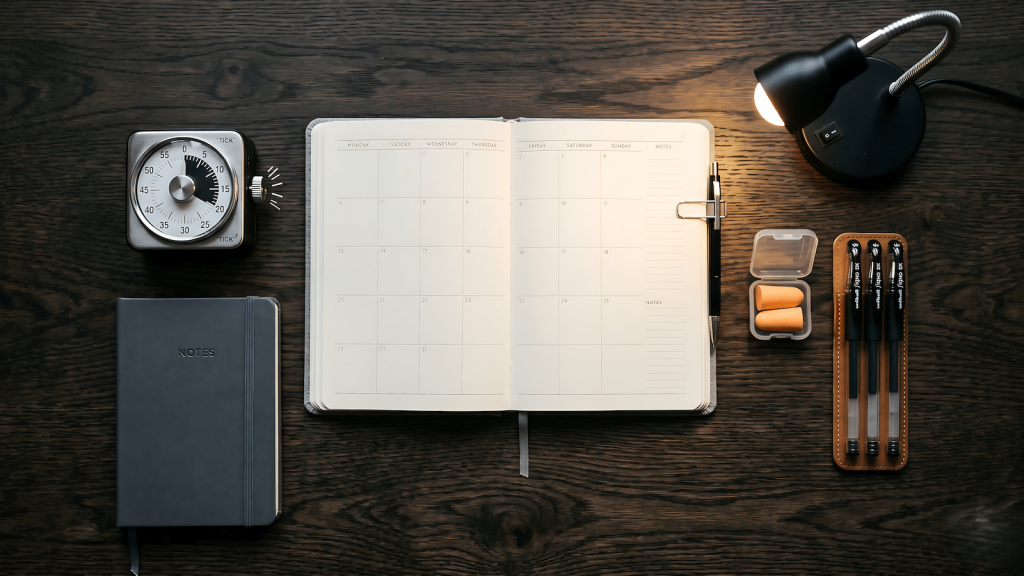
| Amazon Basics Mechanical Timer | 60-minute countdown, no app required | Analog, no charge, no notifications, does exactly one thing |
| Amazon Basics Earplugs | 32dB NRR, foam, bulk pack | Cheaper and more reliable than noise-canceling headphones for deep work |
| Amazon Basics LED Desk Lamp | Adjustable color temp, USB port | Consistent lighting matters for long sessions, this one doesn’t flicker |
| Amazon Basics Notebook | College ruled, 100 sheets, 3-pack | Cheap enough to actually write in without overthinking it |
| Amazon Basics Gel Pens | Smooth ink, 0.7mm, multipack | Writes without skipping, doesn’t bleed through notebook pages |
What to Skip
Noise-canceling headphones are the biggest budget trap in the productivity gear category. They are genuinely useful for people who work in loud shared spaces regularly. For a home setup where you control the environment, a $6 pack of foam earplugs blocks more sound more reliably at a fraction of the cost. Save the headphone budget for when you’ve confirmed you need audio, not just silence.
Digital planning apps are not a productivity setup item. They’re a system item. If you don’t have a working system yet, adding a digital layer to it won’t create one. Start with paper. The friction of writing by hand slows you down enough to think about what you’re writing, which is useful when you’re trying to get clarity. Most productivity systems fail not because of the tools but because of the structure underneath them. Once the paper system is running, evaluate whether a digital version adds anything to it.
Desk organizers above the $20 range solve an aesthetic problem, not a productivity problem. Papers aren’t distracting you because they’re in an ugly tray. They’re distracting you because you haven’t processed them. A cheap tray holds paper exactly as well as an expensive one. The organizational problem is upstream of the container.
Making the Setup Stick
A productivity setup on a budget works when it’s frictionless enough to deploy consistently and cheap enough that you’re not precious about modifying it. The goal isn’t a perfect system. It’s a system that you actually run. The planner that gets used every day in pencil is more valuable than the one sitting on the shelf because you’re waiting until you have the right pen for it. If context switching is already breaking your momentum, adding gear that requires configuration before each session makes it worse, not better.
Start with the timer and the notebook. Those two things together cover the core of what a physical productivity setup needs to do: one defines the work session, one captures the output of it. Add the lamp if your current lighting is causing fatigue. Add the earplugs if your environment is noisy. Add the planner only if you’ve been running on a system and identified that a structured weekly layout would help it. If your home office setup is also part of the equation, the same layered approach applies to the gear around your desk. Buy in order, use each thing before adding the next, and you’ll end up with a productivity setup on a budget that actually runs.